Introduction
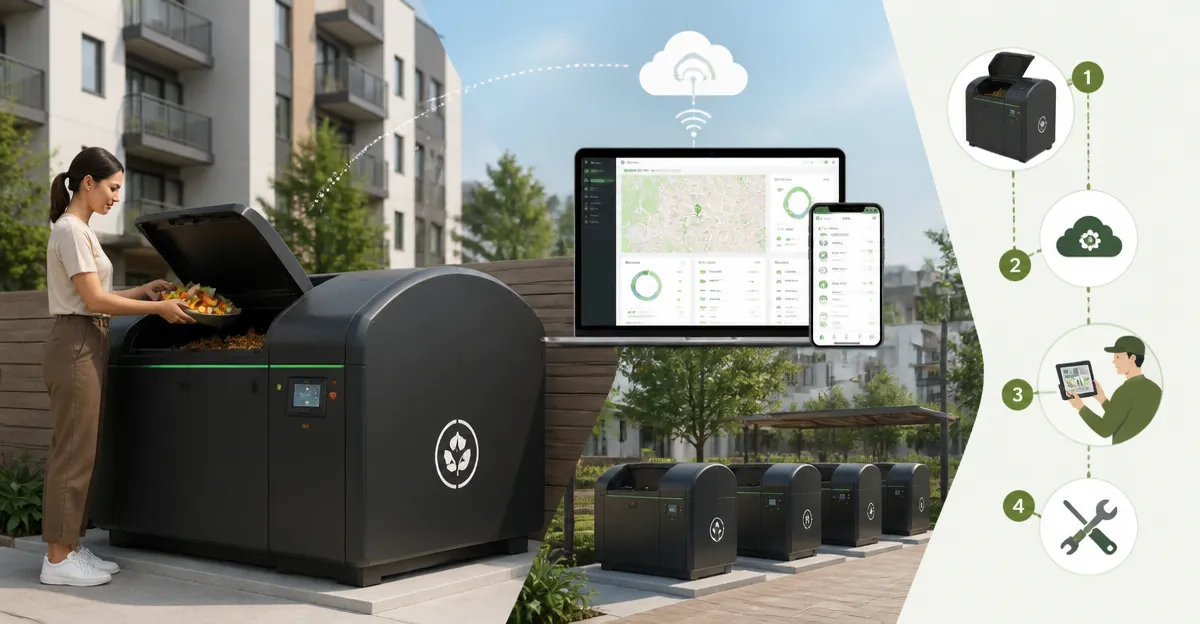
The property manager will learn how to implement a scalable smart composting solution across multiple residential buildings. This guide explains each phase from site assessment to ongoing maintenance, emphasizing efficiency and sustainability. By following the steps, one can reduce organic waste, lower disposal costs, and enhance resident satisfaction. The information is valuable because it combines practical hardware selection with modern API integration.
What You’ll Need
- A high‑capacity outdoor compost bin such as the Trellume 285 Gallon Outdoor Metal Composter.
- Smart temperature and moisture sensors compatible with RESTful APIs.
- Wi‑Fi or Ethernet network infrastructure covering the composting zones.
- Basic tools: drill, screwdriver set, protective gloves.
- Access to a cloud platform for data storage and visualization.
Step‑by‑Step Instructions
1. Assess Site Requirements
The property manager should begin by mapping each building’s waste generation patterns. Conduct a survey of kitchen waste volume, seasonal leaf fall, and resident participation rates. Identify locations that receive at least six hours of sunlight and have adequate drainage, as these conditions accelerate microbial activity. Record dimensions to confirm that the selected compost bin will fit without obstructing walkways.
2. Plan Composting Zones
Divide the complex into logical zones based on building clusters or floor levels. Allocate one composting station per zone to minimize transportation distance for residents. Ensure each zone has a designated collection point for kitchen scraps, clearly marked with signage. This planning step reduces the time residents spend carrying waste and encourages consistent use.
3. Install Infrastructure
Prepare the ground by leveling the area and laying a permeable base of gravel or sand. This foundation promotes airflow and prevents water pooling, which can create anaerobic conditions. Install power outlets or PoE (Power over Ethernet) switches to supply the smart sensors. Verify that the network signal strength meets the minimum requirement of –70 dBm for reliable data transmission.
4. Deploy the Trellume 285 Gallon Outdoor Metal Composter
Unpack the Trellume 285 Gallon Outdoor Metal Composter and position it on the prepared base. The bin’s large 285‑gallon capacity (41" L × 41" W × 39.4" H) allows the complex to handle high volumes of organic waste, reducing the frequency of emptying cycles. Its rust‑proof coating and painted finish protect the metal from corrosion, ensuring a long service life even in humid climates. The four‑sided ventilation system supplies continuous oxygen, accelerating decomposition without manual turning, which is essential for a hands‑free operation in a multi‑unit setting.
To assemble, align the plug‑in components and press until they lock securely; the process typically takes less than ten minutes. Use protective gloves as recommended to avoid skin irritation from sharp edges. Once assembled, open the convenient bottom access door to collect finished compost without disturbing the active layers above. This design simplifies the harvesting process for maintenance staff.
5. Integrate Smart Sensors
Select temperature and moisture sensors that transmit data via HTTP POST requests to a designated endpoint. Mount the temperature sensor near the center of the compost mass, where thermal gradients are most representative. Place the moisture sensor at a depth of 12‑18 inches to monitor water content accurately. Connect the sensors to the network using the previously installed Ethernet ports or Wi‑Fi repeaters.
6. Configure the API and Dashboard
Develop a lightweight API that receives sensor payloads, validates the JSON structure, and stores the records in a cloud database such as Amazon DynamoDB. Implement authentication using API keys to restrict access to authorized personnel. Create a dashboard using a visualization tool like Grafana, displaying real‑time temperature, moisture, and compost progress metrics. Set threshold alerts—for example, temperature above 60 °C or moisture below 40 %—to notify the property manager via email or SMS.
7. Train Residents and Staff
Organize a brief onboarding session for residents, explaining what materials are acceptable for composting and how to use the collection bins. Provide printed guidelines that highlight the difference between aerobic and anaerobic decomposition, emphasizing the importance of maintaining proper moisture levels. Train maintenance staff on how to operate the bottom access door of the Trellume bin, harvest finished compost, and reset sensor batteries. Continuous education reduces contamination and maximizes the efficiency of the composting system.
8. Monitor, Maintain, and Scale
After the system goes live, the property manager should review dashboard data daily for the first month to establish baseline performance. Perform routine inspections of the compost bin to ensure the ventilation vents remain unobstructed. Replace sensor batteries every six months, or configure them with solar panels for uninterrupted power. When the waste volume grows, consider adding additional Trellume units in high‑traffic zones, leveraging the same API architecture to aggregate data from multiple bins.
Tips & Pro Tips
- Rotate the compost pile lightly every two weeks to distribute heat evenly, even though the ventilation system reduces the need for frequent turning.
- Mix brown (carbon‑rich) and green (nitrogen‑rich) waste in a 3:1 ratio to maintain optimal microbial activity.
- Use a simple pH test strip to monitor acidity; a range of 6.0–7.5 indicates healthy decomposition.
- Integrate the compost output into the complex’s landscaping program, using the finished material as organic fertilizer for communal gardens.
- Document each maintenance activity in a logbook, linking the entry to the corresponding API timestamp for accountability.
Troubleshooting
| Issue | Possible Cause | Solution |
|---|---|---|
| Temperature remains below 30 °C | Insufficient nitrogen content or poor aeration | Add more kitchen scraps, ensure vents are not blocked, and lightly turn the pile. |
| Moisture sensor reports 80 %+ | Excess water from rain or over‑watering | Cover the bin with a breathable tarp during heavy rain and balance wet waste with dry leaves. |
| API does not receive data | Network connectivity issues or incorrect endpoint URL | Verify Wi‑Fi signal strength, test the endpoint with a curl request, and confirm API keys are valid. |
Conclusion
The property manager now possesses a comprehensive roadmap for deploying a smart composting fleet across an apartment complex. By selecting a robust bin such as the Trellume 285 Gallon Outdoor Metal Composter and integrating real‑time sensor data, one can achieve efficient waste reduction and produce valuable organic fertilizer. Ongoing monitoring, resident education, and data‑driven adjustments ensure the system remains effective over time. Implementing these practices not only lowers operational costs but also demonstrates a commitment to environmental stewardship.
Products Mentioned in This Guide
Frequently Asked Questions
What hardware is recommended for a large‑scale smart composting system in apartment complexes?
A high‑capacity outdoor bin like the Trellume 285‑gallon metal composter combined with REST‑API‑compatible temperature and moisture sensors is recommended.
How do I connect smart composters to a property’s network?
Install Wi‑Fi or Ethernet coverage in compost zones and configure each sensor’s network settings to communicate with your cloud platform.
What data should be collected via the composting API and why?
Collect temperature, moisture, and fill‑level data to monitor compost health, prevent odors, and optimize collection schedules.
How can property managers use the API data to reduce waste disposal costs?
By analyzing sensor data you can schedule pickups only when bins are full, avoiding unnecessary hauls and lowering fees.
What ongoing maintenance is required for a smart composter fleet?
Regularly calibrate sensors, inspect hardware for damage, and ensure the cloud platform’s firmware and API keys are up‑to‑date.