How to Schedule Countertop Composter Cycles for Off‑Peak Electricity: A Step‑by‑Step Guide to Save Energy and Cut Bills
Introduction
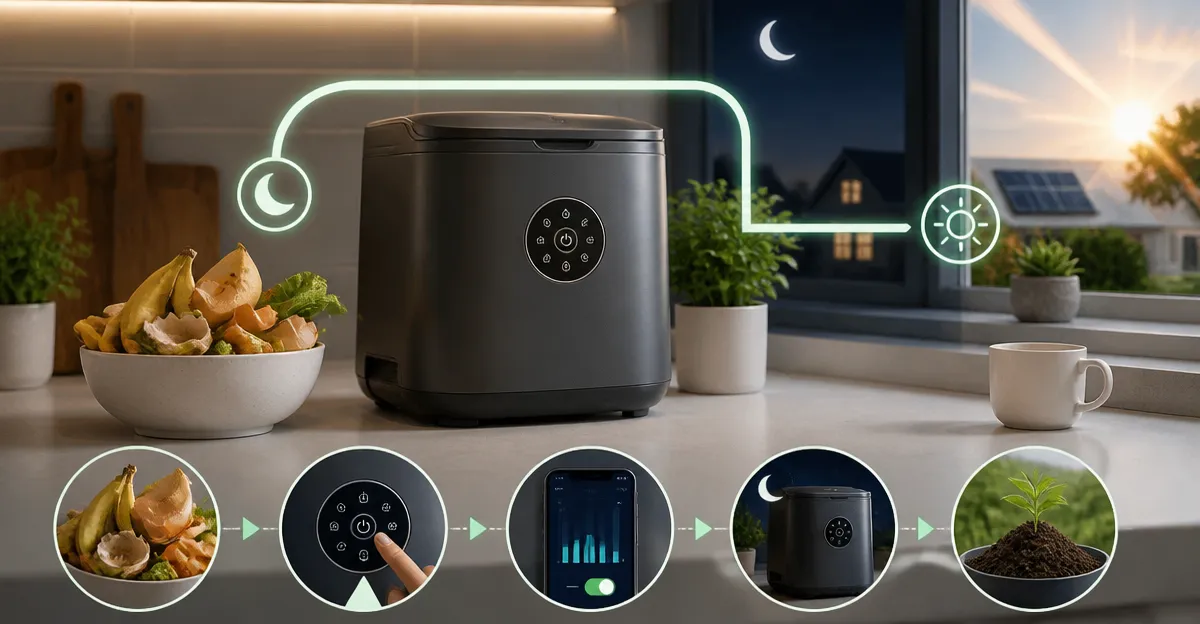
In this guide the reader will learn how to align countertop composter operation with off‑peak electricity periods, thereby reducing energy consumption and lowering monthly utility costs. The process is valuable because indoor composters consume electricity continuously while grinding, drying, and cooling food waste; shifting those cycles to cheaper rate periods can produce measurable savings without compromising compost quality. The guide also highlights tools that simplify scheduling and improve overall composting efficiency.
What You’ll Need
- One countertop electric composter (see product recommendations below)
- A smart plug or timer capable of programmable on/off intervals
- Access to your utility’s off‑peak schedule (often available on the provider’s website or billing statement)
- Basic kitchen waste collection bin for pre‑sorting scraps
Recommended products are linked at their first mention and include pricing, ratings, and key features.
Step 1: Identify Off‑Peak Electricity Periods
The first action is to determine when the electricity provider offers reduced rates. Many utilities define off‑peak hours as late evening to early morning, typically between 10 p.m. and 6 a.m. Consult the provider’s rate plan documentation or online portal to note the exact start and end times. Record these times in a visible location, such as on the refrigerator door, to ensure consistent reference.
Understanding the rate structure enables the user to plan composter cycles during the cheapest hours, which can reduce the energy cost per cycle by up to 30 % depending on the tariff.
Step 2: Choose a Compacter with Programmable Modes
Select a countertop composter that offers multiple operating modes and low‑noise performance, allowing it to run overnight without disturbance. The Ouaken 4L Electric Composter provides Crush, Ferment, and Clean modes, a quiet operation below 40 dB, and an intuitive touch interface. It is priced at $219.99, holds a 4‑liter capacity, and carries a rating of 4.2 stars from 915 reviews. These attributes make it suitable for scheduling because the user can select a low‑energy Crush mode for off‑peak operation while preserving odor control.
Alternative models such as the FRYLINE 4L Electric Composter also support quiet operation and multiple modes, priced at $175.32 with a 4.2‑star rating. Choose the unit that best matches the kitchen’s aesthetic and budget.
Step 3: Acquire a Smart Plug or Timer
To automate the start of the composter during off‑peak hours, a programmable smart plug is essential. The plug should support scheduling in 15‑minute increments and provide energy monitoring to verify savings. Although specific brands are not listed in the product data, any reputable smart plug that integrates with a home Wi‑Fi network will suffice. Connect the composter’s power cord to the smart plug, then plug the smart plug into a standard outlet.
Program the smart plug to power on the composter at the beginning of the off‑peak window, for example 10 p.m., and to power off after the selected cycle duration (typically 3–6 hours). This ensures the unit runs only when electricity is cheapest.
Step 4: Prepare Food Waste for Efficient Processing
Before loading the composter, sort food scraps into categories that the machine handles best. Most electric composters perform optimally with a mixture of wet and dry materials. Cut large items such as vegetable stems, fruit skins, and bread into pieces no larger than 2 cm to prevent blade strain. Avoid adding excessive amounts of hard items like large bone fragments, which can damage the blades of some models.
For users of the Reencle Prime 14L Electric Composter, the larger 14‑liter capacity permits processing of up to 2.2 lb of waste per day, making it ideal for households that generate higher volumes of scraps. It is priced at $499.00 and enjoys a 4.4‑star rating from 368 reviews. The microbe technology in this unit accelerates decomposition, allowing shorter cycles that fit comfortably within off‑peak windows.
Step 5: Set the Desired Operating Mode
Choose the mode that aligns with the off‑peak schedule. For most users, the Crush mode provides rapid volume reduction with minimal energy draw, making it perfect for overnight runs. If the user wishes to produce higher‑quality compost for gardening, the Ferment mode can be scheduled for a later off‑peak slot when a longer cycle (up to 12 hours) is acceptable.
The Soliddis 4.2L Electric Composter emphasizes a "Crush & Dry" technology that focuses on fast drying, which is advantageous for users who want to complete the cycle within a single off‑peak period. It costs $207.99, holds a 4.2‑star rating, and includes a carbon filter for odor control.
Step 6: Activate the Cycle via Smart Plug
Once the waste is loaded and the mode is selected, the smart plug will supply power at the programmed time. The user should verify that the composter’s lid is securely closed to activate the safety interlock. The device will begin grinding, drying, and cooling automatically. Monitor the first cycle through the transparent lid to ensure proper operation.
If the composter includes an auto‑clean function, enable it after the cycle completes. This feature reduces manual maintenance and ensures the unit remains ready for the next off‑peak run.
Step 7: Collect and Use the Finished Compost
After the cycle ends, open the lid and remove the processed material. The output is a dry, crumbly substance that can be mixed with garden soil at a 1:10 ratio for optimal nutrient release, as recommended by the Natridy Electric Kitchen Composter. This model costs $229.99, carries a 4.9‑star rating from 21 reviews, and features a detachable blade that simplifies cleaning of the bucket.
Store the compost in a sealed container if immediate application is not possible. The low moisture content prevents mold growth, preserving the material for future use.
Tips & Pro Tips
- Always empty the bucket before starting a new cycle to avoid clumping and reduced efficiency.
- Use the carbon filter replacement alerts (available on most models) to maintain odor‑free operation.
- Combine dry paper towels or shredded newspaper with wet scraps to improve drying speed.
- Set the smart plug to a slightly earlier start time (e.g., 9:45 p.m.) if the composter requires a warm‑up period before reaching optimal temperature.
- For households with multiple composters, stagger the start times to balance the load on the electrical circuit.
Troubleshooting
| Problem | Possible Cause | Solution |
|---|---|---|
| Machine does not start at scheduled time | Smart plug not connected to Wi‑Fi or schedule not saved | Verify Wi‑Fi connection, re‑enter schedule, and test manual activation. |
| Unusual odor during cycle | Overloaded with wet material or carbon filter saturated | Reduce load size, replace carbon filter, and run a short Clean cycle. |
| Noise level exceeds 45 dB | Blade jam or motor strain | Pause the cycle, inspect for foreign objects, and clear obstruction before restarting. |
| Cycle stops prematurely | Power interruption or safety interlock triggered | Check lid closure, ensure power supply is stable, and restart via smart plug. |
Conclusion
By following the steps outlined above, one can schedule countertop composter cycles to coincide with off‑peak electricity rates, thereby reducing energy expenses and contributing to a more sustainable household. The guide demonstrates how to select an appropriate composter, automate power delivery with a smart plug, and optimize waste preparation for efficient processing. Implementing these practices not only saves money but also encourages responsible waste management and provides valuable organic material for gardening.
Products Mentioned in This Guide
Frequently Asked Questions
How can I program my countertop composter to run during off‑peak electricity hours?
Connect the composter to a smart plug or timer, set the on/off schedule to match your utility’s off‑peak times, and let the device operate automatically.
What type of smart plug is best for controlling a countertop composter?
Choose a Wi‑Fi or Zigbee smart plug with programmable schedules, energy monitoring, and a load rating that exceeds the composter’s wattage (typically 150‑300 W).
Will running the composter only during off‑peak periods affect compost quality?
No; the composter’s grinding, drying, and cooling cycles work the same, and timing them off‑peak does not compromise the decomposition process.
How much money can I expect to save by shifting composter cycles to off‑peak hours?
Savings vary, but most users see a 10‑20 % reduction in monthly electricity costs for the composter, translating to $5‑$15 per year depending on rates.
Do I need to manually start each compost cycle after the timer runs?
No; once the schedule is set, the smart plug powers the composter on and off automatically, so no daily manual intervention is required.